
There is something quietly magical about counting months. I remember how a simple calendar can suddenly become very important when a family is waiting for a baby girl, because every passing month feels like one little step closer to meeting her.
A month can hold appointments, preparations, tiny clothes folded into drawers, and a thousand thoughts about what life will look like after she arrives. In moments like these, knowing the exact space between two dates can be surprisingly useful, even if the reason behind the counting is deeply emotional.
A Months Calculator makes this kind of counting much easier. Instead of looking through a paper calendar and counting month by month, you can use an online calculator to find the number of months between dates, add months to a particular date, or subtract months from a chosen date.
It turns a small date puzzle into something you can solve in just a few clicks, which is honestly pretty handy.
Whether you’re planning a baby shower, checking a pregnancy milestone, remembering a family anniversary, organizing a project, or simply wondering how many months have passed since an important day, a months calculator can save time. And when dates get messy, this little tool becomes even more useful.
| Months Calculator | Quick Result |
|---|---|
| Add months | Find a future date |
| Subtract months | Find a past date |
| Months from today | Calculate upcoming dates |
| Months before a date | Find an earlier date |
| Months between dates | Calculate the time gap |
What Is a Months Calculator?
A Months Calculator is a simple date calculation tool designed to work with months and dates. Its main purpose is to help you perform three common tasks: Add months, Subtract months, and find Months between two dates. These functions cover most everyday situations where month-based date arithmetic is needed.
For example, suppose you have a reference date of September 17, 2026, and want to know what date will arrive after 9 months.
You can enter the starting date, select the appropriate operation type, enter 9, and let the calculator produce the result. There is no need to manually turn pages on a calendar, which can get confusing faster than you’d expect.
The tool can also help you calculate months between dates. If one date is March 1, 2022 and the other is August 22, 2024, the calculator can help you understand the month interval between those dates. This is particularly helpful when a date range is too long to count comfortably by hand.
How the Months Calculator Works
Using the calculator is generally very straightforward, even if you aren’t particularly comfortable with date calculations. First, choose what you want the tool to do. The available options normally include adding months, subtracting months, or finding the months between dates.
For the first option, Add months, you provide a starting date and the number of months you want to move forward. For Subtract months, you do the opposite and move backward.
The third option, Months between, requires a Start Date and an End Date so the calculator can determine the relevant interval.
Once the required input fields are completed, select the Calculate button. Your results should appear immediately.
If you entered something incorrectly or simply want to start again, the Clear button removes the current information. Small thing, but very useful when you’re doing several calculations one after another.
How to Use the Months Calculator Step by Step

The easiest way to understand a month calculator is to see how the process works in ordinary language.
Step 1: Choose the Operation Type
At the beginning of the calculator, look for the operation type field. This determines what kind of calculation you want to perform. You can normally choose between adding months, subtracting months, and calculating Months between dates.
If you want to discover a future date, choose Add months. If you’re checking an earlier date, choose Subtract months. And if you are interested in the time separating two dates, select Months between.
Step 2: Enter the Dates
The next step involves entering the relevant dates into the input fields. Depending on the calculator, you may manually enter the date using Month/Day/Year, or you can use the calendar icon to pick it.
The Start Date acts as your base date. When you’re finding a date range, the End Date represents the point where the calculation finishes. This sounds almost too simple, but choosing the wrong date is one of those tiny mistakes that can completely change your result.
Step 3: Enter the Number of Months
When performing month addition or month subtraction, you’ll also need to enter the number of months. For example, you might enter 9 months to move nine months forward from your starting date.
The calculator then performs the required month calculation and displays the new date.
Step 4: Check the Results
Finally, click Calculate and review the results. If the answer looks unexpected, check the starting date, operation, and number of months you entered.
You can use the Clear option to remove the existing information and perform another calculation. It’s a simple workflow, but it makes repeated date calculations much less annoying.
Months Calculator for Adding Months
One of the most useful features is the ability to add months to a date. This can be useful when planning events, tracking anniversaries, estimating future deadlines, or simply finding out what date occurs several months after today.
For example, suppose the current date is September 17, 2026 and you want to calculate 10 months ahead. Starting with September 17, each additional month moves the date forward while keeping the day number where possible.
Here is a practical example:
- +1 month → Thursday, September 17, 2026
- +2 months → Saturday, October 17, 2026
- +3 months → Tuesday, November 17, 2026
- +4 months → Thursday, December 17, 2026
- +5 months → Sunday, January 17, 2027
- +6 months → Wednesday, February 17, 2027
- +7 months → Wednesday, March 17, 2027
- +8 months → Saturday, April 17, 2027
- +9 months → Monday, May 17, 2027
- +10 months → Thursday, June 17, 2027
This is where an online months calculator becomes especially convenient. Instead of manually moving through ten calendar pages, you can let the tool perform the calculation in moments.
Months Calculator for Subtracting Months
The same idea works backward when you need to subtract months from a date. This is useful when you want to determine what happened a certain number of months ago, or when working backward from a deadline or anniversary.
For instance, if you have a reference date and want to know what date was 3 months ago, select Subtract months and enter 3. The calculator moves backward from your chosen date and provides the corresponding result.
This function is sometimes more convenient than searching for a months ago calculator, especially when you don’t want to use the current date as your reference. You can choose almost any starting point and perform the calculation from there.
People often use this feature for historical records, planning, school schedules, subscription periods, project timelines, and personal milestones. It’s not glamorous work, maybe, but accurate dates matter.
Months Calculator for Months Between Dates
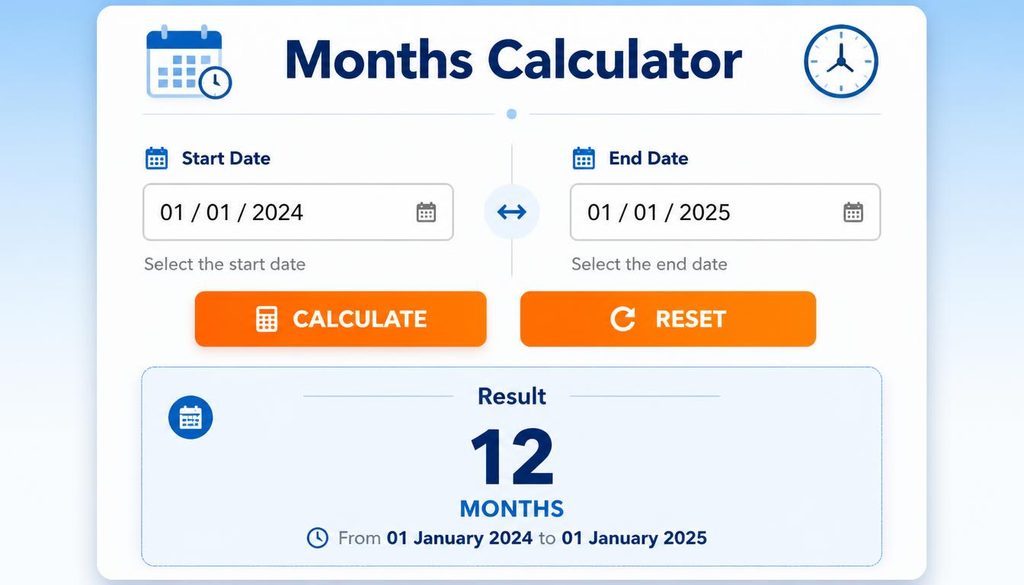
Another major purpose of a Months Calculator is to determine the total number of months between two dates. This is useful when you need to understand a longer time period without manually counting each month.
Imagine you’re comparing March 1, 2022 with August 22, 2024. Enter the first date as the Start Date and the second as the End Date, select the months-between option, and then press Calculate.
The result helps you understand the date difference in months. Depending on how the calculator handles partial months, the result may need to be interpreted differently from simply counting calendar month names.
This is an important point, because “months between dates” can sometimes mean complete calendar months, approximate months, or an exact date interval.
For financial records, contracts, memberships, and official schedules, always check what method your particular calculator uses. A number that looks simple can hide a slightly complicated calendar story underneath it.
Understanding Start Date and End Date
The Start Date and End Date are the foundation of most date calculations. The start date is where your calculation begins, while the end date is where it finishes when you’re measuring a range.
For example, if you’re calculating the interval between two events, you might enter March 1, 2022 as the Start Date and August 22, 2024 as the End Date. Reversing those dates could change the direction or interpretation of the result.
When using a date range calculator, take a second to check both fields before pressing Calculate. That extra second can prevent a surprisingly silly mistake.
Calendar View and Date Selection
Some calculators include a calendar view that makes date selection easier. Instead of typing a date, you can open the calendar and choose the exact day visually.
The calendar icon is especially useful if you’re unsure about the correct formatting. Rather than worrying whether you typed Month/Day/Year correctly, you simply select the date from the displayed calendar.
This feature can be helpful when calculating older or future dates, because looking at the calendar gives you a little visual reassurance that the chosen day is actually the one you intended.
Months From Now and Months Ago

People often search for phrases such as months from now or months ago when they really want a quick future or past date. These are common everyday questions.
For example, someone may ask, “What date is 6 months from now?” Another person may want to know, “What date was 6 months ago?” A calculator can answer both questions by using today’s date as the reference point.
A dedicated months from now calculator generally moves forward from the current date, while a months ago calculator moves backward. A more flexible reference date calculator, however, lets you choose your own starting point.
That difference matters when your calculation isn’t actually based on today.
Why Month Calculations Can Be Tricky
At first glance, calculating months seems almost laughably easy. Twelve months make a year, so how difficult could it be? Well, calendars enjoy making things slightly more interesting.
Months have different numbers of days. February can have 28 or 29 days, while other months contain 30 or 31. Because of this, adding a month isn’t always the same thing as adding a fixed number of days.
For example, moving one month from January 31 can create a different outcome depending on the date-calculation rules used by the tool. This is why a dedicated month calculator can be preferable to simply multiplying months by 30 days.
When precision matters, use a tool that clearly explains its date arithmetic rather than making your own rough estimate.
Months Calculator for Planning Important Events
A month-based calculator isn’t only for technical date questions. It can also become a quiet planning companion for meaningful family moments.
When a baby girl is expected, families may use months to plan celebrations, prepare a nursery, organize gifts, or remember important milestones. The exact date might be less important emotionally than the feeling behind it, but having accurate dates still makes planning smoother.
A grandparent might mark a future family gathering several months ahead. Parents may count months until a birthday or celebration. Friends could plan a baby shower around an estimated schedule.
The calculator doesn’t create the happiness, of course, but it can remove some of the little planning headaches.
Baby Girl Milestones and Month Based Memories

Welcoming a daughter often turns ordinary dates into treasured memories. The day she arrives becomes a family landmark, and every month afterward can feel like a tiny chapter in a much bigger story.
Different cultures celebrate newborns in different ways. Some families gather relatives for a naming ceremony, others hold a small religious or family blessing, while some prefer a quiet meal at home.
In many South Asian families, the arrival of a baby brings relatives together, with prayers, sweets, gifts, and warm wishes passed around almost before everyone has finished saying congratulations.
A simple message such as “May your daughter bring endless happiness to your home” can become even more meaningful when attached to a particular family milestone. Dates give memories their little handles, so we can hold onto them.
Creative Ways to Use a Months Calculator
There are many situations where calculating months can make everyday planning easier.
You can use it to:
- Find the number of months between dates for anniversaries.
- Calculate future months for upcoming events.
- Calculate past months for historical milestones.
- Check the total months between dates for a project.
- Find a date several months after a reference date.
- Determine how many months ahead a deadline is.
- Discover how many months before an event a reminder should be scheduled.
- Calculate a month interval between two important dates.
- Compare dates using a date range calculator.
- Perform simple date arithmetic without counting manually.
It can also be useful for school terms, subscriptions, memberships, financial planning, appointments, travel preparation, and personal goal tracking. Basically, wherever dates start becoming a little tangled, this tool can help untangle them.
Common Mistakes When Calculating Months
One common mistake is confusing months with days. A month isn’t always 30 days, so estimating every month as exactly 30 days can create an inaccurate result.
Another mistake is entering the wrong year. This sounds obvious, but when you’re moving several years backward or forward, it is surprisingly easy to miss the year field.
People can also confuse the Start Date and End Date. Before clicking Calculate, quickly check both dates and confirm that they represent what you actually mean.
Finally, remember that different tools may treat partial months differently. If you need an exact months between dates result for an important purpose, understand the calculator’s counting method before relying on the number.
Months Calculator vs. Manual Calendar Counting

You can absolutely count months manually. Nobody is stopping you. Grab a monthly calendar, mark the beginning date, and start counting month names until you reach the other date.
But manual counting becomes inconvenient when the period is long or when several calculations are needed. A calendar calculator is faster, while an online months calculator can perform the work almost instantly.
Manual counting can still be useful for understanding the basic concept. The calculator simply saves your time and reduces the chance of skipping a month somewhere in the middle.
How to Get More Accurate Results
Accuracy begins with accurate information. Always enter the correct Date input, especially the day, month, and year.
If your calculator offers Calendar selection, consider using it instead of typing dates manually. This can reduce formatting errors.
Also make sure you select the correct operation. Choosing Add months when you meant Subtract months will obviously produce the wrong direction, even if every other input is perfect.
Finally, read the results carefully. Don’t just glance at the number and move on. If you’re using the answer for an important deadline or family event, verify the resulting date against a normal calendar too.
A Simple Example of Month Calculation
Let’s imagine that today is September 17, 2026, and someone wants to know what date will arrive after 10 months.
They would select Add months, use September 17, 2026 as the starting date, enter 10 in the month field, and press Calculate.
The resulting date is June 17, 2027.
Now imagine the question changes: “What was the date 3 months before September 17, 2026?” The operation changes to Subtract months, and the calculator moves backward instead.
This is the basic idea behind almost every month calculation. Choose your starting point, choose your direction, enter the number, and let the calculator handle the calendar.
How to Write a Personal Baby Girl Congratulations Message

While a calculator can help you manage dates, it can’t write the feeling of welcoming a daughter for you. That part belongs to people.
A good baby girl congratulations message usually becomes more meaningful when it mentions something specific. Instead of writing only “Congratulations on your baby girl,” you could mention the family’s excitement, the baby’s name if known, or a special memory.
For example, a grandparent might write a message about waiting for the little one’s arrival. A friend could mention how excited they are to meet her. A sibling might offer a funny welcome that becomes a family keepsake years later.
The nicest messages don’t need fancy vocabulary. Sometimes a few honest words carry more warmth than a whole paragraph trying too hard.
The Emotional Side of Counting Time
There is a strange beauty in counting months because time is both numerical and emotional. A calculator sees September 17 and June 17 as dates. A family might see them as “the day we started preparing” and “the day we finally celebrated.”
That is why tools like a Months Calculator can be useful beyond ordinary arithmetic. They help organize the measurable side of life while people fill those measurements with memories.
A month can represent waiting, planning, growing, learning, celebrating, or simply getting closer to someone you love. Numbers are cold by themselves, but the stories attached to them aren’t.
Frequently Asked Questions About Months Calculator
What is a Months Calculator used for?
A Months Calculator can calculate months between two dates, add months to a date, or subtract months from a date. It is useful for personal planning, deadlines, anniversaries, and date-based calculations.
Can I calculate months between two dates?
Yes. Select the Months between option, enter the Start Date and End Date, then click the Calculate button to see the result.
Can I add months to a specific date?
Yes. Select Add months, enter your starting date and the number of months, and the calculator will calculate the future date.
Can I subtract months from a date?
Yes. Choose Subtract months and provide the starting date and number of months you want to move backward.
Does a month always equal 30 days?
No. Calendar months have different lengths, so one month is not always exactly 30 days. This is one reason dedicated date-calculation tools can be useful.
Frequently Asked Questions
9 months before march
Nine months before March falls in June of the previous year, depending on the specific March date.
9 months before april
Nine months before April falls in July of the previous year, depending on the specific April date.
9 months from october
Nine months from October falls in July of the following year, based on the same day of the month.
what is 9 months from today
Nine months from today is June 17, 2027, using today’s date of September 17, 2026.
3 months from now
Three months from now is December 17, 2026, using today’s date of September 17, 2026.
Read this Blog:https://wevorix.com/weeks-calculator-2/
Final Thoughts on Months Calculator
A Months Calculator may look like a very small online utility, but its usefulness stretches across everyday life.
It can help you calculate months from a date, count months between two dates, move toward future months, or look backward at previous months without making you wrestle with a calendar.
From March 1, 2022 and August 22, 2024 to September 17, 2026 and June 17, 2027, dates can represent much more than numbers. They can mark beginnings, endings, celebrations, promises, and family memories.
And perhaps that is why month counting feels especially meaningful when a baby girl enters a family. The calendar suddenly seems to have a new purpose. Every month becomes part of her story, from the first preparation to the first birthday and all the ordinary beautiful days in between.
So use the calculator for the numbers, use the calendar for the planning, and use your own words for the memories. When you look back someday, you probably won’t remember the calculation itself. You’ll remember why you were counting in the first place.
