
There are dates we remember because something important happened on them, and then there are dates we remember because we spent twenty minutes trying to figure out what on earth they meant.
A birthday, a project deadline, a pregnancy milestone, a holiday trip, or simply the question, “How many weeks ago was that?” can turn ordinary date calculation into a surprisingly fiddly little task.
That is where a Weeks Calculator becomes useful. Instead of staring at two calendars and counting little boxes until your eyes lose the will to continue, you can use a calculator to work out a week difference between dates, find a date several weeks in the future, or discover exactly when a date occurred several weeks ago.
It sounds simple, and honestly, it is once the dates are entered correctly.
A good week calculation tool is essentially a quiet assistant for time. It takes a Start Date, an End Date, or a reference date plus a number of weeks, performs the calculation, and gives you a clear Result. No dramatic calendar gymnastics required, thankfully.
| Feature | Description |
|---|---|
| Weeks Between Dates | Find the exact number of weeks between two dates. |
| Weeks From Date | Calculate weeks forward or backward from a selected date. |
| Total Days | Convert the calculated days into weeks easily. |
| Complete Weeks | Shows the number of full weeks between dates. |
| Easy Calculation | Get quick and accurate week results. |
What Is a Weeks Calculator?
A Weeks Calculator is a digital Calculator designed to answer questions involving weeks and dates. Depending on the tool, it may calculate the number of complete weeks between two dates, add a certain number of weeks to a date, or subtract weeks to find an earlier date.
Some tools even show the remaining days when the interval isn’t an exact number of weeks, which can be quite handy.
Think of it as a bridge between ordinary calendar dates and the slightly more abstract idea of time intervals. You know something happened on one date and another thing happened later, but your brain doesn’t always feel like doing the counting.
The calculator does the boring bit for you, and thats probably one of its finest qualities.
Most versions have a few straightforward Input fields. You might see Start Date, End Date, a field for the number of weeks, and an Operation Type selector.
Once you’ve entered the information, pressing the Calculate button produces the answer. A Clear button can then wipe the fields so you can start again without deleting things one by one.
In simple terms, the relationships are pretty neat:
- Weeks Calculator calculates the number of weeks.
- Start Date represents the starting or reference point.
- End Date represents the ending point of the interval.
- Operation Type determines what kind of calculation happens.
- Calculate button produces the calculation result.
- Clear button resets the input fields.
- Weeks Between finds the interval between two dates.
- Add Weeks moves a date forward.
- Subtract Weeks moves a date backward.
It isn’t trying to reinvent time, which is good because time already has enough personality of its own.
Why Use a Weeks Calculator Instead of Counting Manually?
Counting weeks by hand sounds easy until the dates cross months, years, leap years, or that peculiar February situation where the calendar suddenly decides it needs fewer days. A manual calculation can still work, but mistakes creep in rather easily, especially when you’re working with a long date range.
For example, imagine you want to know the number of weeks between December 1, 2022 and December 25, 2024. You could count every day, divide the total by seven, check whether your interpretation of the endpoints matches the calculator, and then check it again because now you don’t trust yourself.
Or, you could enter the two dates into a Weeks between dates calculator and let the tool handle the arithmetic.
A calculator is also useful when the question runs in the opposite direction. Maybe you know the starting date and need to know what date comes after 7 weeks, 14 weeks, or 21 weeks. That is an Add weeks calculator job rather than a weeks-between-dates job.
The same goes backward. If a particular event occurred on a reference date and you need to know what date was 14 weeks ago, a Subtract weeks calculator can find it without making you count backwards through several calendar pages.
Thats a small convenience, but small conveniences tend to become very useful when deadlines are involved.
How to Calculate Weeks Between Two Dates

The most common reason people search for a Weeks Calculator is simple: they want to know how many weeks are between two dates.
The process usually looks like this:
- Pick the Weeks Between operation.
- Enter the Start Date.
- Enter the End Date.
- Check the selected dates carefully.
- Press the Calculate button.
- Read the Result showing the week interval.
The calculator typically determines the number of days between the two dates and converts that date difference into weeks.
If the number of days isn’t divisible by seven, some calculators may display weeks and remaining days rather than pretending the answer is an exact whole number.
For instance, suppose the starting date is September 12, 2026, written as 09/12/2026 in a month/day/year format, and the ending date is February 6, 2027, written as 02/06/2027.
A Weeks between dates calculator can determine the precise interval between those dates, rather than relying on an estimate like “about five months.”
This matters because months aren’t equal lengths. Saying “five months is roughly twenty-two weeks” may be fine for casual conversation, but it isn’t the same thing as calculating the actual difference in weeks. Calendars are annoyingly specific that way.
How Does a Weeks Between Dates Calculator Work?
Behind the friendly calculator interface, the idea is pleasantly ordinary. The tool takes the two dates, determines the date difference, and then relates that difference to seven day periods.
One week contains seven days, so a calculation involving weeks is fundamentally a calculation involving days.
If the interval contains 21 days, the answer is 21 weeks between dates only if the interval contains 147 days; 21 days would instead equal three weeks. This is exactly why entering dates correctly is more important than people sometimes think.
The calculator doesn’t generally care whether the dates are emotionally meaningful to you. It sees a starting point, an ending point, and a time interval. Your job is to make sure the starting and ending points are the ones you actually intended.
There is also a small but important issue of date format. 09/12/2026 could mean September 12, 2026 in one convention, while someone using day/month/year formatting might read it as 9 December 2026.
A trustworthy calculator should make the date format obvious, but the person entering the dates still needs to keep an eye on it. One tiny format misunderstanding can send the whole calculation wandering into the wrong calendar.
Add Weeks Calculator: Finding a Future Date
Sometimes you don’t want to know the difference between dates at all. You already have one date and simply want to know what happens after a certain number of weeks.
That’s when an Add weeks calculator becomes the useful option.
The basic process is wonderfully uncomplicated:
- Select Add Weeks as the Operation Type.
- Enter your Start Date or Base Date.
- Enter the number of weeks you want to add.
- Press Calculate.
- Check the future date shown in the Result.
If you enter a starting date and add 7 weeks, the calculator moves forward by 49 days. Add 14 weeks, and it moves forward by 98 days.
Add 21 weeks, and it moves forward by 147 days. It sounds almost too obvious written down, but having the calculator perform the calendar movement removes mistakes involving month lengths.
This can be useful for project schedules, recurring appointments, study plans, personal goals, event preparation, or anything else where the timeline is naturally measured in weeks. Instead of saying “sometime around the end of next month,” you get a concrete date after a number of weeks.
In other words, the Add Weeks operation moves the date forward. Your base date stays conceptually fixed while the calculator finds the future point. Its a simple idea, but a very practical one.
Subtract Weeks Calculator: Finding an Earlier Date
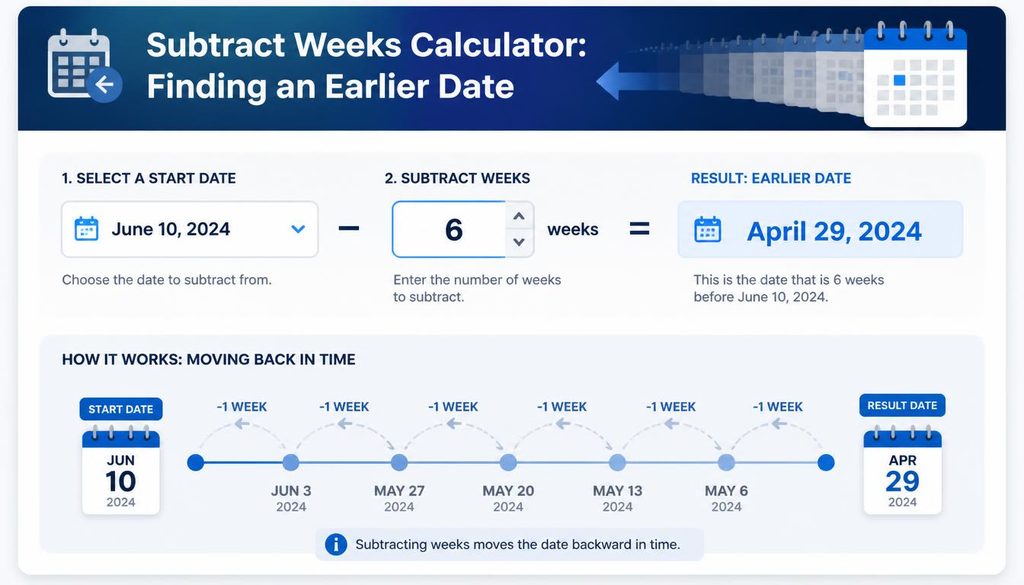
The reverse calculation is equally useful. An Subtract weeks calculator, despite the slightly awkward name some tools use, helps you find a date before a given reference date.
Imagine that today is your reference date and you want to know what date was 14 weeks ago. You select Subtract Weeks, enter the date, type 14, and calculate. The result gives you the corresponding earlier date.
This is especially useful when someone remembers an event by approximate weeks rather than by calendar date.
“That happened about 7 weeks ago” is easy to say, but figuring out the exact day from memory can be surprisingly difficult. A weeks ago calculator turns that vague memory into an actual calendar date.
The same operation can be used for schedules. If an event is planned for a known date and you need to begin preparation 21 weeks beforehand, the calculator can identify the earlier planning date.
It is essentially a backwards calendar, which sounds slightly magical until you remember it is just arithmetic wearing a calendar costume.
Weeks Calculator for Planning and Everyday Life
A Weeks Calculator isn’t only for people who enjoy numbers or have suspiciously organized calendars. It can be useful in everyday situations where weeks are a more natural unit than days.
Students might use it to measure how many weeks remain in a semester. Someone organizing a trip could calculate the number of weeks between booking and departure.
A project manager can establish milestones based on a starting date. Families may use week-based calculations for appointments, celebrations, or personal planning.
It can also help when comparing two important dates. If you know an event happened on one date and another event occurred later, a Date difference calculator can show the interval. When the result is expressed in weeks and days, the time period can suddenly become easier to understand.
For example, “147 days” is accurate but somewhat cold. “21 weeks” feels more tangible when you’re planning something that naturally progresses week by week. Numbers have personalities too, apparently.
Weeks From Now and Weeks Ago
Two common search questions are “What date will it be after X weeks?” and “What date was it X weeks ago?” Both can be answered using the same general calculation principle.
For weeks from now, the current date acts as the Reference Date or base date. You add the desired number of weeks and receive a future date. If you want to know what date falls 7 weeks from today, the tool performs that week addition.
For weeks ago, you reverse the operation. The current or selected date becomes the reference point, and the calculator subtracts the required number of weeks.
This is useful when planning deadlines, reminders, events, or personal goals.
You might think, “I’ll deal with that 14 weeks from now,” but calendars have a sneaky habit of making future dates feel farther away than they actually are. The calculator gives the idea a proper date, which makes planning much less fuzzy.
Understanding Weeks, Days, and Date Differences

Not every date range produces a clean number of weeks. A date range might represent 20 days, 30 days, 45 days, or some other period that doesn’t divide neatly by seven.
That means a good tool may show results in a form such as weeks plus days. This is often more informative than simply rounding the answer. Rounding could turn a 20-day interval into “3 weeks,” but 20 days is actually 2 weeks and 6 days. Those aren’t quite the same thing when precision matters.
This is where the distinction between weeks and days between dates becomes useful. If you are casually estimating a time period, whole weeks may be enough. If you are working with a contract, deadline, schedule, or formal record, the exact number of days may matter more.
A Date difference calculator can therefore be useful alongside a weeks calculator. One focuses attention on the calendar interval, while the other presents that interval in a week-oriented way. Same stretch of time, slightly different lens.
A Simple Step by Step Guide to Using a Weeks Calculator
If you’re using a calculator for the first time, there is no secret ritual involved. The process generally follows a handful of steps.
- Pick the operation. Select Weeks Between, Add Weeks, or Subtract Weeks.
- Enter the starting date. This is your Start Date, base date, or reference point.
- Enter the ending date if needed. For a date-range calculation, provide the End Date.
- Enter the number of weeks if required. This applies to week addition or subtraction.
- Check the date format. Make sure a date like 09/12/2026 means what you think it means.
- Press Calculate. The Calculate button starts the operation.
- Read the result. The output may show weeks, days, or both.
- Use Clear when finished. The Clear button resets the fields for another calculation.
It sounds almost laughably straightforward, but following the sequence prevents most common input mistakes. The calculator can only calculate the information you give it, and unfortunately it has not yet developed mind-reading abilities.
Common Mistakes When Calculating Weeks
One of the most common mistakes is entering the wrong date. This happens especially when people copy dates from different sources that use different formats. Always check whether the calculator expects month/day/year or day/month/year.
Another mistake is confusing days with weeks. If a calculator asks for the number of weeks you want to add or subtract, entering 14 because you mean 14 days will produce a completely different result. This distinction is particularly important for an Add weeks calculator or Subtract weeks calculator.
People also sometimes assume every month equals four weeks. That’s convenient for rough thinking but not accurate for date calculations. Four weeks is 28 days, while most months have 30 or 31 days. February, meanwhile, does its own thing.
Finally, be careful with inclusive and exclusive counting. Asking how many days are “between” two dates can be interpreted differently depending on whether the starting or ending day is included.
A reliable tool should make its method clear, but if you’re using the result for an important deadline, always understand what the displayed interval represents.
Weeks Calculator vs. Date Calculator

A Date calculator is a broader category of tool. It may calculate days between dates, add or subtract days, determine future dates, or perform other calendar operations.
A Weeks Calculator, by comparison, specializes in week-based calculations. That makes it especially convenient when the task is naturally expressed in weeks rather than individual days.
There can be overlap between the two. A date calculator may allow you to add 49 days, while a weeks calculator lets you add 7 weeks. Mathematically, those operations can lead to the same date, but the second approach communicates your intention more clearly.
For people searching specifically for a date to weeks calculator, the key question is usually whether the tool can translate a date interval into weeks and possibly remaining days. If that is the task, a dedicated weeks tool can feel much less cluttered than a general-purpose calculator.
And yes, there are some rather oddly named online tools too, including things like Subscriptioncalculator, which may sound related because of the word “calculator,” but it is intended for a completely different type of calculation. Names can be misleading sometimes, so always check what the tool actually calculates before entering your dates.
Real Life Examples of Week Calculations
Suppose you’re planning an event and your starting date is September 12, 2026. You want to know when the event preparation milestone should happen 7 weeks later.
Instead of manually moving through September, October, and perhaps November, you can use Add Weeks and enter 7.
Now imagine you have a deadline on February 6, 2027 and want to establish a preparation date 14 weeks earlier. Select Subtract Weeks, use February 6, 2027 as the reference date, and enter 14.
Or perhaps you have two dates performs: comparing two dates, moving forward from a date, and moving backward from a date.The arithmetic itself is straightforward, but accuracy depends on the tool’s date-hand for different month lengths and leap years automatically.
It should also clearly distinguish dates from the number of weeks being added or subtracted.
If those basics are handled properly, the result December 1, 2022 and December 25, 2024 and want to understand the length of the entire period in weeks. Select Weeks Between, enter the two dates, and let the tool calculate the interval.
These examples show the three basic jobs a week calculator performs: comparing two dates, moving forward from a date, and moving backward from a date. Most other uses are variations on those same ideas.
How Accurate Is a Weeks Calculator?
The arithmetic itself is straightforward, but accuracy depends on the tool’s date-handling rules and, importantly, the information you enter.
A well-designed calculator should account for different month lengths and leap years automatically. It should also clearly distinguish dates from the number of weeks being added or subtracted.
If those basics are handled properly, the result should be reliable for ordinary calendar calculations.
However, for legal, financial, medical, or contractual deadlines, don’t assume that a generic calculator’s definition of a date interval automatically matches the official rules that apply to your situation.
Sometimes a deadline is defined by business days, calendar days, inclusive counting, or a specific local regulation. A calculator can do the arithmetic, but it can’t decide the legal meaning of the deadline.
That little distinction matters. A calculator is a tool, not a tiny lawyer hiding inside your browser.
Choosing the Right Calculation for Your Question

Sometimes the easiest way to choose a calculator operation is to look at the wording of your question.
If you’re asking, “How many weeks are between two dates?” choose Weeks Between.
If you’re asking, “What date comes 14 weeks after this date?” choose Add Weeks.
If you’re asking, “What date was 14 weeks before this date?” choose Subtract Weeks.
If you’re asking, “How many days are between these dates?” a Date difference calculator may be the better choice.
This sounds almost comically simple, but choosing the right operation before entering information is one of those tiny habits that saves confusion later. You don’t need a complicated calculation when a simple one is sitting right there.
Why Week Based Planning Can Feel Easier
There is something psychologically tidy about weeks. Days can feel like scattered pebbles, while weeks arrive in recognizable little bundles. “Three weeks from now” gives many people a clearer sense of distance than “21 days from now,” even though they mean the same duration.
That is why week-based planning appears in so many areas of everyday life. Study schedules, training plans, project milestones, recurring routines, event preparation, and personal goals can all be easier to organize around weeks.
A Weeks Calculator simply gives that way of thinking a precise calendar anchor. Instead of a vague “later,” you get a date. Instead of “a while ago,” you get a measured interval. It turns a fuzzy stretch of time into something you can actually put on a calendar.
Frequently Asked Questions
week calculator from date
A week calculator from date helps you find the exact number of weeks between a starting date and another selected date.
calculate weeks
Calculate weeks between two dates quickly by finding the total days and converting them into weeks for an easy result.
no of weeks calculator
A no of weeks calculator shows how many complete weeks are between two dates, making date calculations simple and convenient.
week calculation
Week calculation determines the number of weeks between dates and can also help you find a future or past date by weeks.
weeks calculator from date
A weeks calculator from date lets you calculate the number of weeks from a specific starting date to any chosen date.
Read this Blog:https://wevorix.com/minutes-ago-calculator/
Final Thoughts: Making Time Easier to Count
Time is strange in the way it can feel enormous while you’re waiting for something and incredibly short once you look back at it. A Weeks Calculator can’t slow it down, thankfully or perhaps unfortunately, but it can make its calendar movements easier to understand.
Whether you need to calculate weeks between dates, find the number of weeks between dates, add weeks to a date, subtract weeks from a date, or discover how many weeks from now a particular milestone will occur, the basic process remains pleasantly simple. Pick the correct operation, enter
